
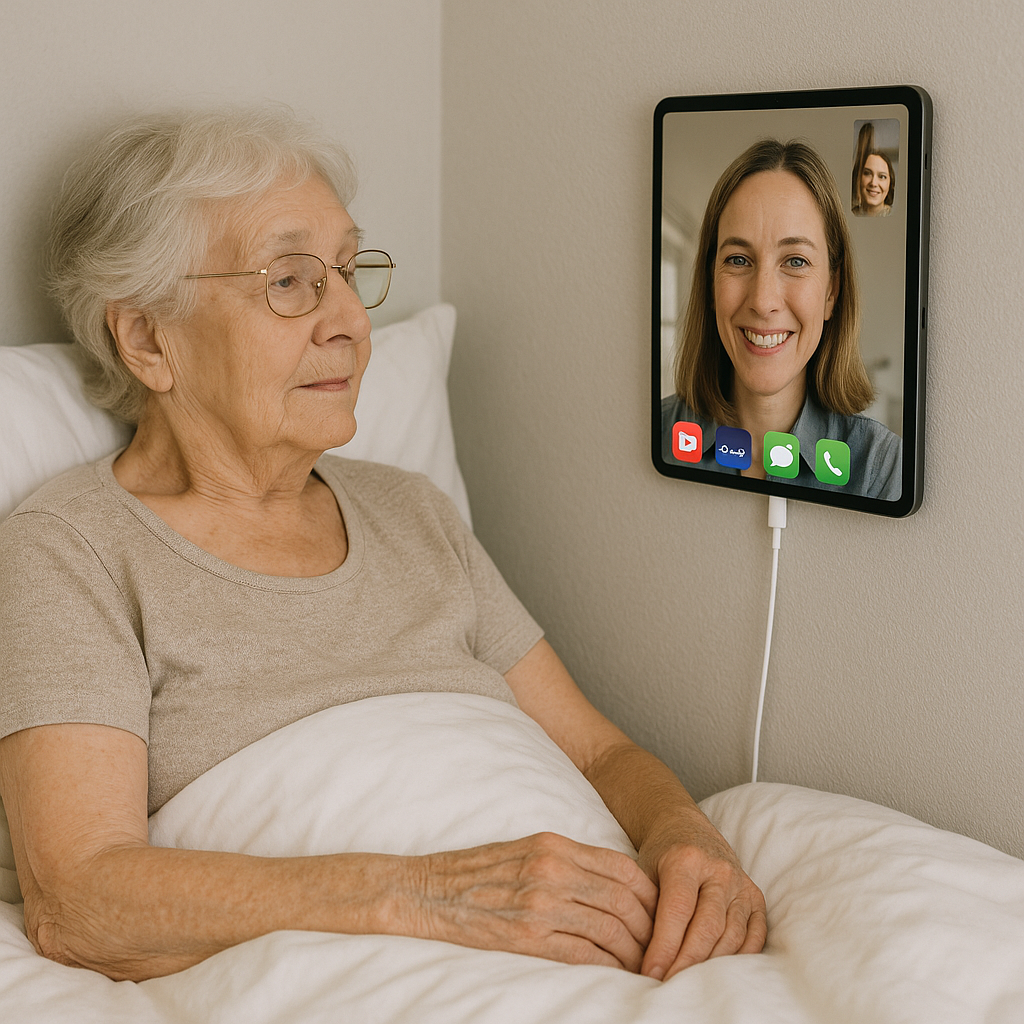
REAL-WORLD WAKE-UP CALL: Your parent lives alone. The TV remote has too many buttons, the phone is on the charger across the room, and calling grandkids means asking someone for help every time. Now picture this instead: a bright 13-inch screen mounted right beside the bed. One tap to FaceTime. One tap to watch a favorite show. No confusion, no frustration — and no reason to feel cut off from the people they love.
The 2025 Apple 13-inch iPad Pro (M5, 8th Generation) is one of the largest and most capable iPad screens Apple has offered. For seniors, a big screen may help reduce eye strain, and simple voice commands can make daily tasks — like video calls, music, and watching shows — accessible without needing to navigate complicated menus. Always verify current specifications, including screen size and accessibility features, at apple.com.
- YouTube — for news and staying mentally engaged
- Disney+ — for movies and classic shows
- Messages — to text loved ones
- FaceTime — for video calls anytime
Caregiver Tip: Delete extra apps to reduce clutter and confusion. A simpler screen is a more usable screen.
- Trade In Every Year and Stay Current — One affordable way to keep a senior on the latest technology is to trade in the old iPad each year. Apple and Amazon both offer trade-in programs. As a general example based on current pricing (subject to change): trading in a 2024 iPad Pro M4 (1 TB) and applying the value toward the 2025 model may reduce the net cost significantly — but always verify current trade-in values directly at amazon.com/tradein or apple.com/trade-in before making any purchasing decisions. Staying current with technology can support ongoing learning and mental engagement, according to AARP.org.
- Accessible and Comfortable — Built-in accessibility tools — including large text, high contrast, and voice control — can support seniors in navigating the iPad independently. “Hey Siri” voice commands allow hands-free control for music, calls, and FaceTime. These features are designed by Apple; check apple.com/accessibility for the full current feature list.
|
Step |
Action |
Details |
|
1. Visit the Trade-In Page |
Go to Amazon Trade-In at amazon.com/tradein |
Check if your device qualifies for trade-in. |
|
2. Select Your Item |
Choose the correct model and brand. |
Amazon shows eligible products — for example, Apple iPad Pro 7th Generation or Apple Watch Ultra 2. |
|
3. Describe Its Condition |
Answer short questions about its functionality. |
Examples: “Does it power on?” / “Is the screen cracked?” / “Are accessories included?” |
|
4. Get a Quote |
Amazon provides an estimated trade-in value. |
You will see how much you can earn — usually issued as an Amazon Gift Card or promo credit. |
|
5. Ship the Item |
Accept the offer, then print the free shipping label. |
Pack your device safely. Drop it off at any UPS or FedEx location — shipping is free using Amazon’s prepaid label. |
|
6. Amazon Inspection |
Amazon inspects your item upon arrival. |
If your description matches, they confirm the value. If not, they may adjust the offer or return the item. |
|
7. Receive Credit |
Your reward is issued. |
Value is applied as Amazon Gift Card credit. Some trades include extra discounts on new devices. |
|
8. Shop with Credit |
Use your credit on Amazon. |
The amount is automatically added to your account balance for your next purchase. |
Reference: Amazon Trade-In page — Screenshot adopted from Amazon.com. Amazon’s interface may change; always check current steps at amazon.com/tradein.
Quick Setup Guide: Mounting Your iPad by the Bed
Caregivers: Set this up once. After that, your parent can use it independently without touching buttons or reaching across the room.
Step 1: Choose the Right Spot
- Place the bed near a wall so the iPad can be mounted at a comfortable viewing height.
- Mount near a power outlet so the charging cable reaches easily without stretching across the floor.
- A covered porch or sheltered indoor wall works best — avoid moisture-prone areas.
Tip: Works well in most apartments, condos, assisted-living rooms, and private care homes. Check with building management before mounting if required.
Step 2: Mount With 3M Double-Sided Tape
- Clean the wall surface thoroughly with a dry cloth before applying tape.
- Apply 3M Scotch Mounting Tape to the back of the Apple Smart Folio Case — follow the weight instructions on the tape package to confirm your iPad’s weight is within the tape’s rated capacity.
- Press the iPad case firmly against the wall for at least 30 seconds. Allow to cure per the tape manufacturer’s instructions before mounting the iPad.
- Snap the iPad into the Folio Case. Confirm it is secure before releasing.
Safety Note: Always verify the mounting tape’s rated weight capacity against your iPad model’s actual weight, listed at apple.com/ipad-pro/specs. Always follow all manufacturer instructions carefully.
Step 3: Set Up Overnight Charging
- Plug the Belkin 9.9-Foot USB-C cable into the iPad and into a wall charger.
- Route the cable neatly along the wall or baseboard to avoid trip hazards.
- Charge overnight — the long cable allows the iPad to stay mounted while charging.
Tip: Use the charger wattage specified by Apple for your iPad Pro model — check apple.com for compatibility. The Belkin cable is designed for up to 100W; confirm your charger matches.
Step 4: Set Up the Four Apps
- Download YouTube, Disney+, Messages, and FaceTime from the App Store if not already installed.
- Press and hold other app icons on the home screen → tap Remove App → Remove from Home Screen to hide them. (This does not delete them.)
- Arrange the four apps in a large, easy-to-tap grid layout. Go to Settings → Display & Brightness → Text Size → increase to maximum for best readability.
- Enable voice control: Settings → Accessibility → Voice Control → turn ON. Your parent can now say “Hey Siri, open FaceTime” without touching the screen.
Caregiver Tip: Walk through each app with your parent once before you leave. A familiar routine removes the fear of getting confused.
Step 5: Share FaceTime with Family
- Open the Contacts app and save family members’ Apple IDs or phone numbers.
- Test a FaceTime call with each family member to confirm audio and video work.
- Show your parent: tap FaceTime → tap a contact’s name → tap the green video button. That is the entire process.
Tip: Families can also share FaceTime links for group calls — helpful for holiday gatherings when multiple people want to join at once.
Things to Consider
- Wall mounting: Always verify the 3M tape’s weight rating against your specific iPad model. Do not mount over a bed if there is any risk the device could fall. Consult a handyperson or caregiver for safer mounting alternatives if needed.
- iPad requires Wi-Fi or Cellular Service: Ensure the senior’s home has a reliable Wi-Fi connection near the bedroom. A mesh Wi-Fi extender may help if the router is far from the bed. For added peace of mind, consider choosing the Wi-Fi + Cellular model (the link below to buy from Amazon), and adding a cellular data plan — so the iPad continues to work even during a power outage or Wi-Fi disruption. Check with your carrier for current senior or family plan discounts.
- Accessibility tools: Designed by Apple and built into every iPad — these are not medical devices. They are intended to improve ease of use. For medical accessibility needs, consult a healthcare professional.
- Trade-in values change: All trade-in estimates in this article are illustrative only. Verify current values directly with Amazon or Apple before making any financial decisions.
Goldie’s Table: Buy This Gift For Loved Ones
|
Product |
Why It Helps Seniors |
Link |
|
2025 Apple iPad Pro 13-inch (M5) |
Large, bright 13-inch screen. Easy touch navigation. Choose Wi-Fi + Cellular, 1 TB, Nano-Texture Glass for best clarity. Verify current specs at apple.com. |
|
|
Apple Smart Folio Case Cover |
Protects your iPad Pro and helps it attach securely to your wall mount. Easy to remove for travel. Pairs with all 13-inch iPad Pro M5 models. |
|
|
3M Scotch Double-Sided Mounting Tape |
Lets you safely mount the iPad next to the bed for hands-free viewing and FaceTime. No tools required. Check weight limits on product packaging. |
|
|
Belkin 9.9-Foot USB-C Charging Cable for Apple iPad Pro (8th Gen) |
Extra-long charging cable that reaches a wall outlet even if it is far from the bed. Designed for 100W fast charging — verify compatibility with your charger. |
Note on product screenshots: Screenshots from Amazon.com are used here as reference illustrations only. Amazon’s product pages and interfaces may change. Always verify current product details, pricing, and availability at amazon.com before purchasing.
Photos adopted from ChatGPT, Claude, Amazon, and Apple.
Disclaimer:
GoldieCircle may feature third-party products and services based on internal evaluation. Such top picks do not constitute a warranty or guarantee of performance, suitability, or lifespan. All products are subject to their respective manufacturers’ terms and conditions. GoldieCircle assumes no liability for any claims or damages arising from the use of any featured product or service.


Loading comments…