
REAL-WORLD WAKE-UP CALL: Sitting at a screen for hours can quietly strain your hands. The CDC’s National Health Interview Survey estimated that about 3 in 100 working adults reported carpal tunnel syndrome in a single year, and the U.S. Bureau of Labor Statistics has repeatedly found carpal tunnel causes among the highest number of workdays lost of any injury — roughly 28 median days away from work per case in its 2015 figures.
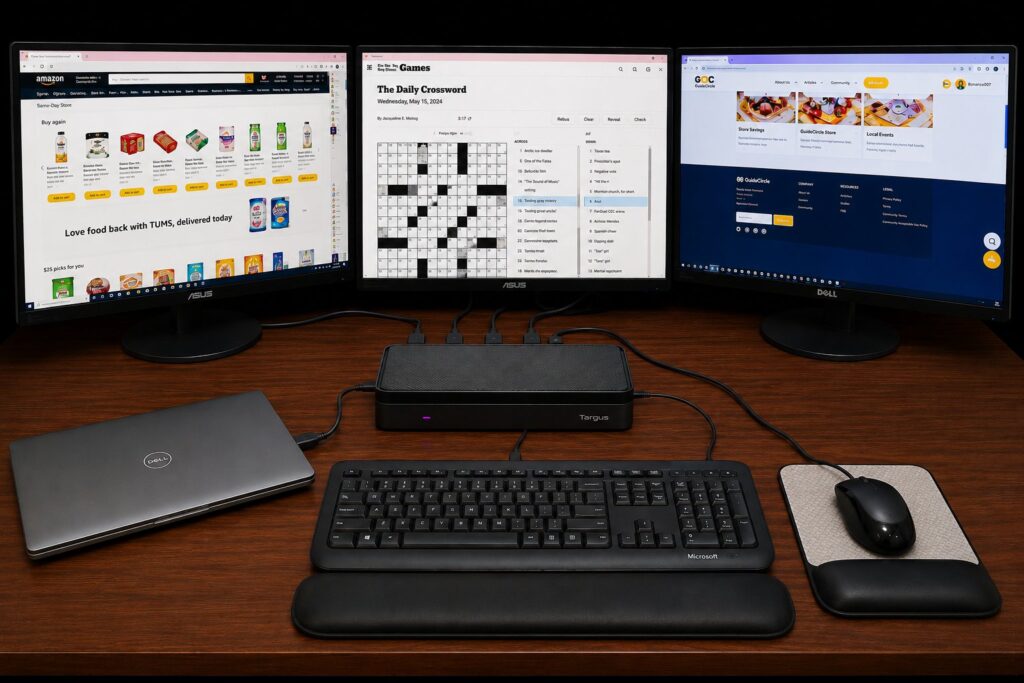
Maybe you want to start a small business from home. Maybe you just want three screens, one screen for chatroom with your GoldieCircle’s friends, one for a crossword puzzle, and one for ordering Amazon’s groceries. Either way, you do not need three computers — you need one laptop and three screens. The hard part is not the screens. It is the small box that connects them, called a docking station. Pick the wrong one and you can end up with error messages, flickering screens, or a dock that quits after a few months. Here is a simpler way.
The Real Problem Is the Docking Station, Not the Screens
Today’s laptops usually have only one or two video ports. To run three monitors, most people add a docking station — one box the laptop plugs into, with the monitors, keyboard, mouse, and internet all plugged into the box. The trouble is that many docks are built for a single brand or laptop model. Connect a Dell-branded dock to an HP laptop, or an older monitor to a newer dock, and you may see errors, blank screens, or no signal at all. Some bargain docks can also overheat or stop working after a short time.
One Universal Dock That Works With Almost Any Laptop
A universal docking station solves most of this. The Targus USB-C Universal Quad 4K Docking Station uses a technology called DisplayLink, which is designed to work across laptop brands — Dell, HP, Lenovo, Mac, and more — instead of locking you into one. It can run up to four displays, so three screens is well within its range. You plug a single cable into your laptop, and your monitors, keyboard, mouse, and wired internet all connect to the dock. It is also designed to send power back to charge most laptops, and Targus backs its docks with a three-year limited warranty. Compatibility can vary by laptop, so check the current manufacturer specifications before you buy.
What Three Screens Can Do for You
Once it is set up, three screens make everyday life easier. On one screen you can visit GoldieCircle.com to chat with friends and read helpful guides. In the middle, you can play the daily crossword without losing your place. On the third, you can order same-day groceries — like fresh organic fruit — and have them delivered to your door. No more clicking back and forth on one small screen.
Don’t Forget the Cables
The dock connects to your laptop with the cable it comes with. But each monitor usually needs its own HDMI (or DisplayPort) cable to reach the dock. If your monitors did not include cables, buy one cable per screen. It is an easy thing to overlook — and an easy thing to fix.
Pick a Big, Easy-to-See Monitor
For comfort, choose monitors that are at least 24 inches. A larger screen lets you make the text bigger without it looking blurry, which is gentler on aging eyes. A stand that tilts or raises can help you set the top of the screen near eye level, so you are not looking down for hours.
Choose a Wired Keyboard and Mouse — Not Wireless
Wireless keyboards and mice look tidy, but they need batteries and can disconnect at the wrong moment. A wired set simply plugs in and works. The Microsoft Wired Desktop 600 is a plug-and-play USB keyboard and mouse with full-size keys, a spill-resistant design, and no batteries to replace — a simple, reliable choice.
Protect Your Wrists
If you type for long stretches, give your wrists some support. A gel mouse pad with a built-in wrist rest cushions the mouse hand, and a gel keyboard wrist rest like the 3M WR309LE is designed to support your wrists in a more neutral position and ease the pressure of resting them on a hard desk. They are inexpensive and can make a long session far more comfortable.
A Few Things to Consider
- Your laptop needs a USB-C or USB port to connect to the dock. Most laptops from the last several years have one.
- Strong, fast internet helps everything run smoothly — especially video chats and same-day ordering.
- If setup feels confusing, ask a family member or caregiver to help the first time. After that, you simply open the laptop and everything is ready.
- Product features can change. Check current manufacturer specifications to confirm compatibility before you buy.
Goldie’s Table: Our Top Picks
|
Product |
Why It Helps Seniors |
Link |
|---|---|---|
|
Targus USB-C Universal Quad 4K Docking Station |
Works across laptop brands (Dell, HP, Lenovo, Mac, and more) using DisplayLink. Connects up to four displays — more than enough for three. One cable to the laptop, plus Ethernet, USB ports, and laptop charging. Three-year limited warranty. |
|
|
HDMI Cables (one per monitor) |
Each monitor usually needs its own cable to reach the dock. Buy one HDMI (or DisplayPort) cable per screen if your monitors did not include them. |
|
|
Large Monitor (24 inches or larger like ASUS brand |
A bigger screen lets you enlarge text without blur — easier on aging eyes. Look for an adjustable stand so the screen sits near eye level. |
|
|
Microsoft Wired Desktop 600 Keyboard & Mouse |
Plug-and-play USB — no batteries, no dropouts. Full-size keys and a spill-resistant design. A simple, reliable everyday set. |
|
|
3M Gel Mouse Pad with Wrist Rest |
Cushions the mouse hand and is designed to support a more neutral wrist position during long sessions. |
|
|
3M Gel Keyboard Wrist Rest |
Soft gel cushion designed to support the wrists while typing and ease the pressure of a hard desk edge. Antimicrobial, easy-to-clean cover. |
Photo adopted from an original ChatGPT illustration created for GoldieCircle. Product details from Targus, Microsoft, and 3M.
Disclaimer: GoldieCircle may recommend third-party products and services based on internal evaluation. Such recommendations do not constitute a warranty or guarantee of performance, suitability, or lifespan. All products are subject to their respective manufacturers’ terms and conditions. GoldieCircle assumes no liability for any claims or damages arising from the use of any recommended product or service.


Loading comments…