
REAL-WORLD WAKE-UP CALL: On a New Jersey hiking trail in 2020, James Prudenciano, 28, and his friend Paige Prusso slipped off a cliff in Hartshorne Woods Park as it grew dark. Both fell hard. Their latest Apple Watches detected the impact and automatically called 911. First responders located them by GPS within 15 minutes (Fox News).
Your child wants a phone. You are not ready. You worry about social media, screen time, and strangers, but you also want to call, text, and know where they are. There is a middle path that many families overlook: set up an Apple Watch under your iPhone using Family Setup. Your child gets their own number, calling, messaging, and live location — you keep full control of apps, contacts, and screen time.
And if you are part of the “sandwich generation” — caring for aging parents while raising kids — this matters even more. When you are driving Mom to a doctor’s appointment or sitting at Dad’s bedside, you cannot also stand at your child’s school bus stop. A cellular Apple Watch on your kid’s wrist lets you glance at Find My, see a green dot on the map, and exhale. Peace of mind, in real time, even when your attention is on a loved one across town.
Why an Apple Watch Beats a Smartphone for Younger Kids
- Total app control. You are the parent on the iPhone. You decide which apps install or come off the watch. Social media platforms like TikTok, Snapchat, and Instagram simply are not on the menu unless you allow them.
- Their own phone number. With cellular Apple Watch + a kids line on your carrier plan, your child can call and text family and approved contacts — just like a phone, on their wrist.
- Real-time location in the U.S. Open Find My on your iPhone and you can see where your child is, get arrival and departure alerts at school, practice, or home. Helpful when you are tied up with an elderly parent and cannot physically be in two places at once.
- Schooltime mode. Locks the watch to a simple screen during school hours so it does not become a classroom distraction.
- Emergency SOS and Fall Detection. Designed to call emergency services and notify your contacts if something goes wrong.
What Works — and What Does NOT
Apple Watch with Family Setup is powerful, but it has limits. Be honest with yourself before you buy:
- Inside the U.S.: Cellular Apple Watch works on its own for calls, texts, and Find My location — your child does NOT need an iPhone.
- International travel: Apple Watch cellular generally does not roam internationally. Outside the U.S., the watch typically only works on Wi-Fi (like at a hotel) or when paired near an iPhone with international service. Once your child leaves Wi-Fi, you may not be able to track or message them. For overseas trips, plan to keep them close or give them an iPhone.
- Confirm features with your carrier and Apple Store: Cellular plans, international roaming, and satellite availability change. Always verify current support before you depend on it.
Step-by-Step: Add Your Child’s Apple Watch Through Family Setup
What you need: an iPhone running a recent version of iOS, a cellular-capable Apple Watch that supports Family Setup (Apple Watch SE, Series 4 or later, Apple Watch Ultra family), a cellular plan for the watch with your carrier, and a Family Sharing group where you are the organizer.
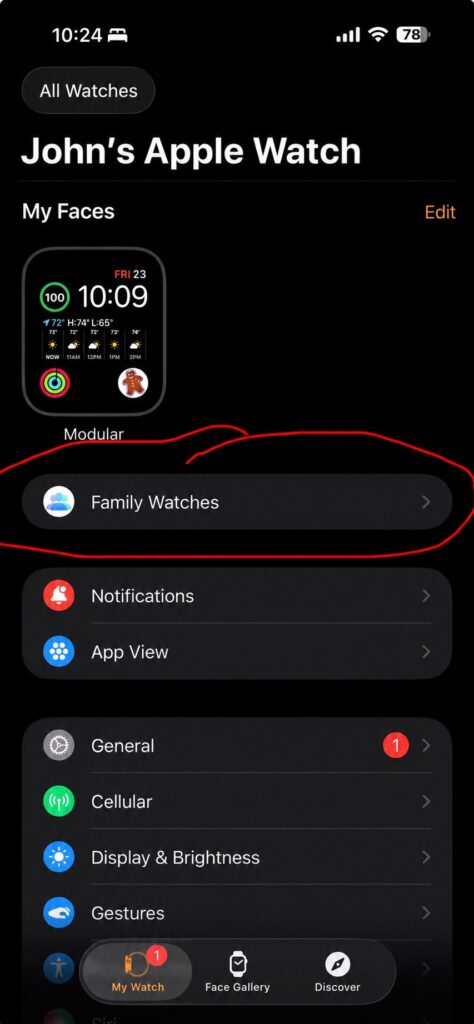
Step 1: Open the Watch App and Tap Family Watches
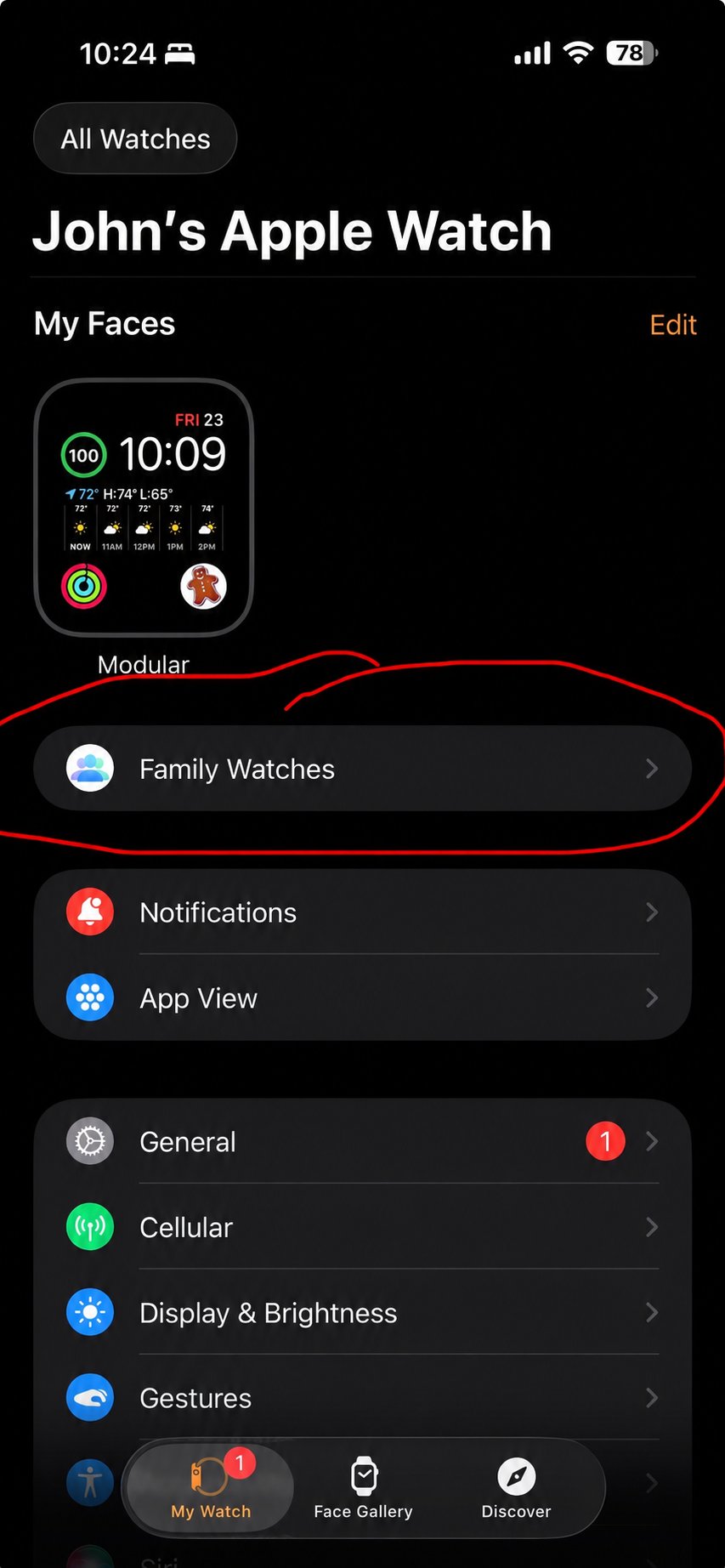
- On your iPhone, open the Watch app.
- Tap All Watches at the top, then tap Family Watches.
- This screen lets you add and manage every watch you control for a family member who does not have their own iPhone.
Step 2: Tap Add Watch and Follow the Pairing Wizard
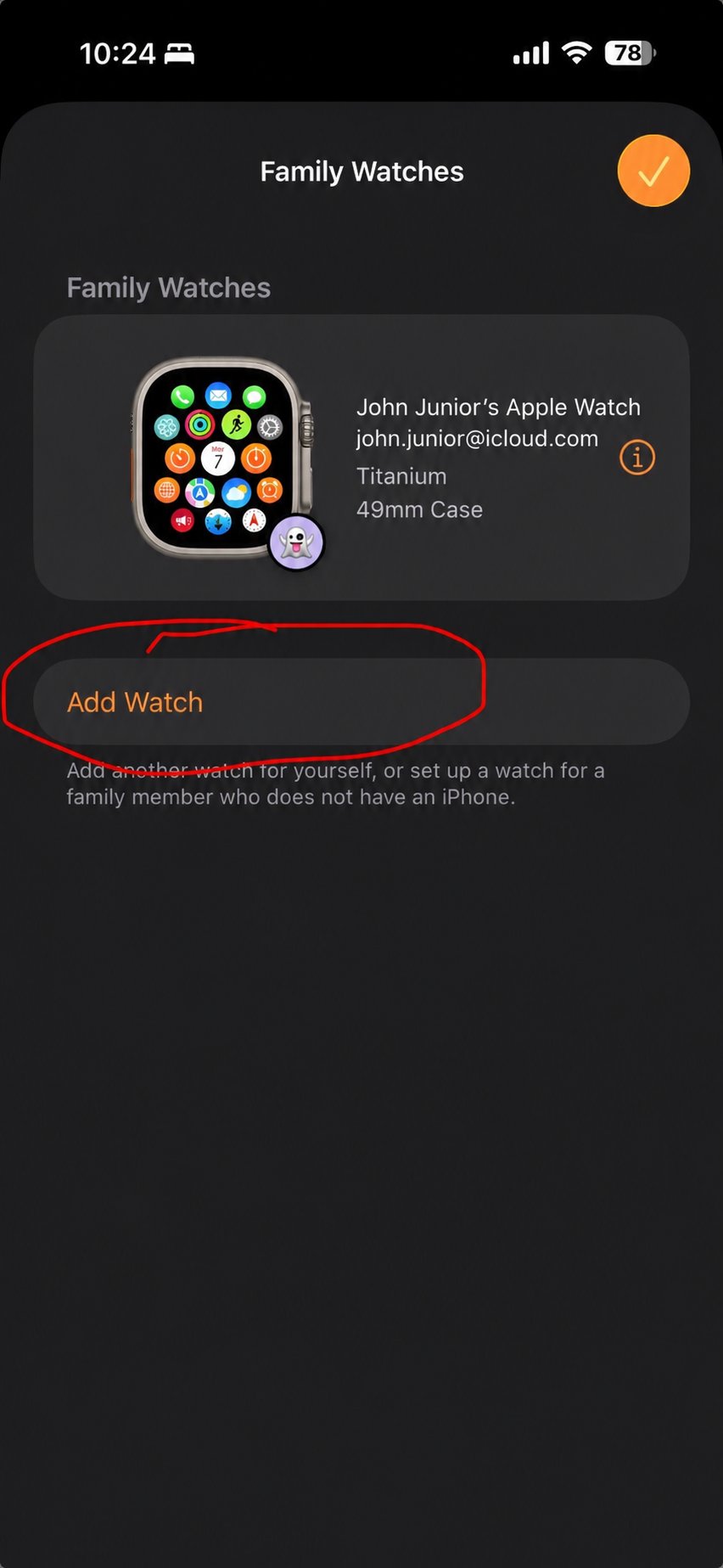
- Tap Add Watch to add another person and choose Set Up for a Family Member.
- Turn on the new Apple Watch and hold it near your iPhone. Use the camera to scan the animation on the watch face.
- Sign in with your child’s Apple ID (or create one). The child must be in your Family Sharing group.
- Activate cellular with your carrier when prompted (this gives the watch its own phone number).
- Set the passcode and turn on Wrist Detection and Find My.
Step 3: Lock Down Apps, Contacts, and Schooltime
- In the Watch app, open your child’s watch from Family Watches.
- Set Contacts: only approved family and friends can call or message the watch.
- Set Screen Time: turn it ON, set a passcode, and configure App Limits, Communication Limits, and Content & Privacy Restrictions.
- Set Schooltime: pick the start and end times so the watch locks to a simple display during class.
- In the App Store on the watch (managed from your iPhone), remove or block any social media apps before handing it over.
Step 4: Turn On Live Location and Notifications
- On the parent iPhone: Settings → Family → your child → Location Sharing → ON.
- Open Find My → People tab. Your child should appear with their current location updating in real time when the watch has signal.
- In Find My, tap your child → Add Notification to get alerts when they arrive at or leave school, home, or practice.
Why We Suggest the Apple Watch Ultra 3 for Active Kids
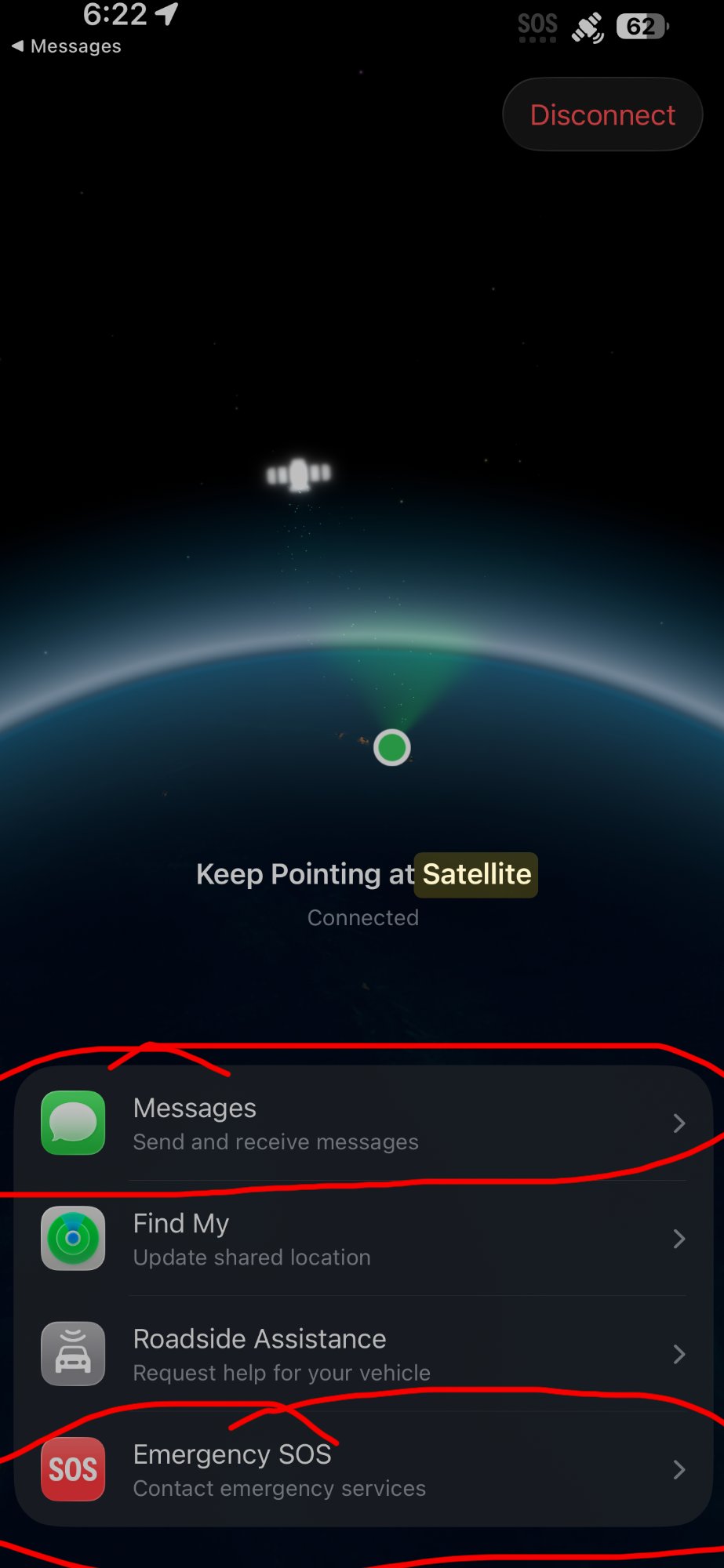
Apple introduced the Apple Watch Ultra 3 in September 2025. According to Apple, it is the first Apple Watch with built-in two-way satellite communications, so a wearer can text emergency services, message family, and share their location even with no cellular or Wi-Fi coverage (apple.com/newsroom, 2025). Apple Support documentation confirms Emergency SOS via satellite, Messages via satellite, and Find My via satellite on Ultra 3 (support.apple.com).
For a kid who hikes, camps, or bikes long routes in the U.S., that capability can be a real safety net. Caveats: satellite needs a clear sky view, is designed for the U.S. and select countries, and pricing/coverage may change. Confirm current availability with your local Apple Store before relying on it.
|
Product |
Why It Helps Parents & Kids |
Link |
|---|---|---|
|
Apple Watch Ultra 3 (49mm Titanium, GPS + Cellular) |
Two-way satellite messaging, Emergency SOS via satellite, large always-on display, up to 42-hour battery, rugged titanium case. Best pick for active kids who hike, camp, or travel in the U.S. |
|
|
Apple Watch SE (GPS + Cellular) |
Most affordable cellular Apple Watch that supports Family Setup. Calling, texting, Find My location, Emergency SOS, and Schooltime. Great starter watch for elementary and middle school. |
|
|
Sport Band or Solo Loop (Kid Size) |
Comfortable, washable band that fits smaller wrists so the watch stays put during sports and play. Easy one-piece designs are hard for kids to lose. |
|
|
Belkin MagSafe-Compatible iPhone Charger, 3-in-1 Wireless Charging Station |
Charges the kid’s Apple Watch and keeps it ready. Also convenient for charging your iPhone and AirPods in one place. |
|
|
Verizon NumberShare (Apple Watch line) |
Adds your Apple Watch as a connected device to your iPhone plan. Starts at $15/month; can drop to about $7.50/month with the 50% smartwatch discount on Unlimited Plus or Unlimited Ultimate (plus a one-time ~$35–$40 activation fee, taxes, and fees). Supports Family Setup. Prices and discounts as of 2025–2026 — confirm current rates with Verizon. |
|
|
AT&T NumberSync Wearable Plan |
Add a wearable line for your Apple Watch starting at $10.99/month, per AT&T’s website. Works on top of an eligible AT&T phone plan. Supports Family Setup. Activation fees, taxes, and fees not included — verify current pricing with AT&T. |
|
|
T-Mobile DIGITS for Apple Watch |
T-Mobile’s wearable line, typically around $15/month with AutoPay on consumer plans (lower on some business plans). Supports Family Setup. T-Mobile frequently runs Apple Watch promotions — confirm current pricing and any bill-credit offers with T-Mobile. |
Screenshots adopted from the Editorial Team’s iPhone. Apple, Apple Watch, Apple Watch Ultra, Family Setup, and Find My, are trademarks of Apple Inc.
Disclaimer
GoldieCircle may recommend third-party products and services based on internal evaluation. Such recommendations do not constitute a warranty or guarantee of performance, suitability, or lifespan. All products are subject to their respective manufacturers’ terms and conditions. GoldieCircle assumes no liability for any claims or damages arising from the use of any recommended product or service. This article is informational only and is not professional advice. Verify carrier coverage, cellular plan terms, satellite availability, and current Apple device support with the manufacturer and your provider before purchase.

Loading comments…