
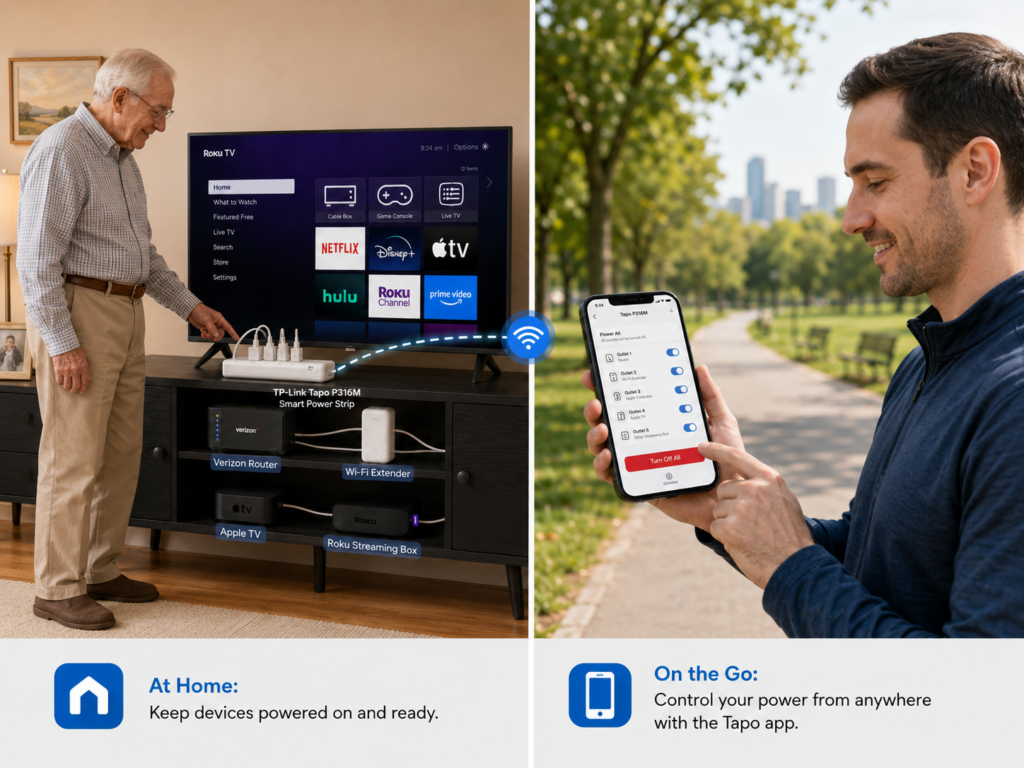
Split-screen image showing remote control of home electronics through the TP-Link Tapo P316M smart power strip. On the left, an 80-year-old senior stands at home beside a TV stand with a Roku TV, Verizon router, Wi-Fi extender, Apple TV, and Roku streaming box plugged into the Tapo smart power strip. On the right, a 30-year-old man at a park uses the Tapo app on his smartphone to turn off the connected devices remotely.
It always seems to happen at the worst moment. Your mom calls because her show won’t load. Your dad can’t get his evening news because the Wi-Fi “just stopped working.” You know the fix that almost always does the trick — turn it off, wait a few seconds, and turn it back on — but you’re across town, and they can’t reach the tangle of cords behind the cabinet. There is a simple, low-cost way to put that fix in everyone’s hands.
The National Institute on Aging reports that about 28 percent of older adults — roughly 13.8 million Americans — live alone, and federal health agencies link social isolation in older adults to higher risks of depression, heart disease, and cognitive decline. For a parent who lives alone, the TV, the tablet, and the Wi-Fi router are often their main link to family and the world outside their front door. When one of those devices freezes and they can’t reach behind the furniture to restart it, that connection can go dark for hours — or days — until someone is able to drive over.
- The reset that always comes first. Powering a device off and back on is the first thing technicians try — and it clears most everyday glitches with streaming boxes, routers, and modems. The Tapo P316M makes that reset effortless.
- One strip, everything on it. Plug the TV or streaming box, the Wi-Fi router, and the Wi-Fi extender into a single Tapo P316M. No more guessing which cord to unplug.
- Two simple ways to restart. A caregiver can power-cycle from anywhere with the free Tapo app, or the senior can press the button on the strip or tap once in the app — right there in the room.
- Everything at once, or just one device. The app’s “Turn Off All” and “Power All” buttons reset the whole setup in one tap, and each outlet also has its own button on the strip for a single device.
- Any brand works. Apple TV, Roku, Fire TV, a smart TV, a Verizon router — it doesn’t matter. The strip controls the power, so the reset works the same every time.
Why the “Off and On Again” Trick Works
Ask any technician how to fix a frozen streaming box or a router that dropped offline, and the first answer is almost always the same: remove the power, wait a few seconds, and plug it back in. Most home electronics clear temporary software glitches and reconnect to the network during that quick power cycle. It is the simplest, most reliable first step in troubleshooting — and it usually works. For a senior, the hard part isn’t the fix; it’s crawling behind the cabinet and pulling the right plug. A smart power strip removes that hurdle entirely.
How One Power Strip Simplifies Everything
The idea is simple: plug all of the entertainment and internet devices into one Tapo P316M, then control the power from one place. The strip offers six individually controlled outlets plus three always-on USB ports, so it can power up to nine devices at once. Instead of talking a parent through “unplug the second black cord from the left,” anyone can reset the whole setup with one action.
When a device acts up, there are two easy options:
- A caregiver, from anywhere: open the Tapo app, tap “Turn Off All,” wait a few seconds, then tap “Power All.” Everything restarts together.
- The senior, in the room: press the button on the strip for that device, or open the app and tap once. No reaching behind furniture.
Because the strip controls the electricity going to each device, it works the same whether the senior has an Apple TV, a Roku, a Fire TV, a smart TV, or a Verizon Wi-Fi router. The brand doesn’t matter — power off, power on, done.
Quick Setup Guide
Ask a caregiver or family member to help with the one-time setup. After that, everything runs normally and can be controlled from a phone.
- Plug the Tapo P316M into a wall outlet. Then plug the TV or streaming box, the Wi-Fi router, and any extender into the strip’s outlets.
- Download the free Tapo app on an iPhone or Android phone. Create an account and tap “+” to add a device.
- Follow the prompts to connect the strip to the home’s 2.4 GHz Wi-Fi. Give each outlet a clear name like “TV,” “Roku,” or “Router.”
- Share access with family. In the app, invite a caregiver or family member so they can help from their own phone, anytime.
A Few Things to Keep in Mind
- Indoor use only. The Tapo P316M is ETL-certified and built with flame-retardant materials, but it is rated for indoor use and is not UL-listed. Check current manufacturer specifications for the latest details.
- Keep life-safety devices on their own outlet. Do not plug a medical alert system, oxygen equipment, or any health or emergency device into a smart-controlled outlet where it could be switched off by accident. Plug those directly into a regular, always-on wall outlet.
- If you put the router on the strip. Turning the router off briefly cuts the internet, so remote control in the app pauses for about a minute until the router is back online. The buttons on the strip still work in the room, and the app reconnects on its own once Wi-Fi returns.
- Strong Wi-Fi helps. For the most reliable remote control, keep the strip within good range of the router, or add a mesh extender if needed.
Buy This for Someone You Love (Our Top Picks)
|
Product |
Why It Helps Seniors |
Link |
|---|---|---|
|
TP-Link Tapo P316M Smart Power Strip |
Six individually controlled outlets plus three always-on USB ports power up to nine devices. Restart everything with one tap in the app, or restart a single device with its own button on the strip. Caregivers can help remotely from anywhere; seniors can reset right in the room. Built-in surge and overload protection. Works the same with any TV, streaming box, or router brand. |
Photo adopted from ChatGPT and TP-Link.
Disclaimer: GoldieCircle may recommend third-party products and services based on internal evaluation. Such recommendations do not constitute a warranty or guarantee of performance, suitability, or lifespan. All products are subject to their respective manufacturers’ terms and conditions. GoldieCircle assumes no liability for any claims or damages arising from the use of any recommended product or service.


Loading comments…