
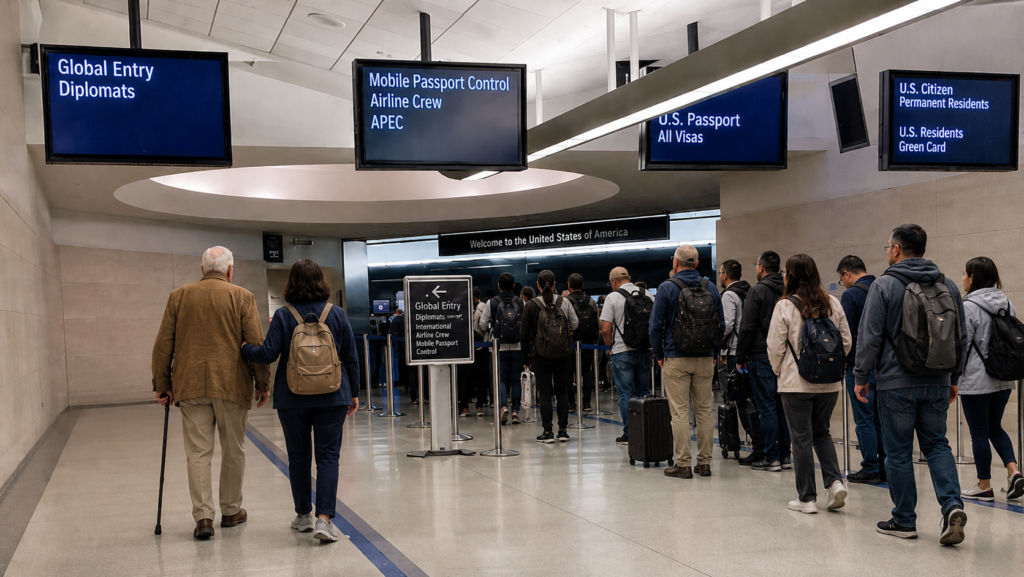
REAL-WORLD WAKE-UP CALL: Travelers have described getting an official-looking email warning that their Trusted Traveler membership was about to lapse, clicking the link, and landing on a page that looked just like the government’s. They entered their name, passport number, and home address, paid a “$140 fee,” and later found that no membership existed and their personal details were gone — among the lookalike-site reports collected by the Better Business Bureau. The Federal Trade Commission says people lost about $76 million to government-impersonation scams paid in cash in 2023 alone. Lesson: never click a link inside a “renew” or “update your passport” message. Open a browser and type the official address — ttp.cbp.dhs.gov — by hand. A real notice and a fake one can look identical, so always starting at the official .gov site is the one habit that protects your parent either way.
You are flying home from a wonderful family trip with your 80-year-old mom. Everyone else files into a customs line that snakes around the hall. Your mom walks straight to the Global Entry lane and is through in a couple of minutes — no long wait, no aching feet, no stress. That ease is exactly why Global Entry is such a gift for older travelers. But one small thing can quietly break it: a renewed passport. If the passport saved in her Trusted Traveler account has expired, the fast lane may stop working — right when she needs it most.
The good news: you can usually fix this yourself in about five minutes, online, without driving to an enrollment center. The catch: scammers know seniors rely on Global Entry, and they send fake “update your passport” emails that look very real. Here is how to do it safely.
Why a New Passport Can Break the Fast Lane
Global Entry works by matching your parent to the passport on file. When she renews her passport, she gets a new passport number and a new expiration date — but her Trusted Traveler account still shows the old ones until someone updates them.
Here is the reassuring part: according to the U.S. Department of State, a Trusted Traveler membership stays valid even if the passport expires. The membership itself does not vanish. But to actually use the benefit at the airport, the account needs the current passport details. If they are out of date, the Global Entry portal may not recognize her, and she could be sent to the regular line. Updating the account fixes that — and it usually takes just a few minutes.
Update It Online in About 5 Minutes (No Trip to an Enrollment Center)
U.S. Customs and Border Protection (CBP) lets Global Entry members update passport information right in their own account. Here is the safe, step-by-step way:
- Open a browser and go directly to the site. On a computer or phone, type ttp.cbp.dhs.gov yourself. Do not use a link from an email, a text, or a search ad.
- Sign in with her Login.gov account. Choose “Login” and use her Login.gov sign-in — the secure single sign-in the government uses. If she does not have one yet, the site walks you through creating it. Each person needs their own account, so use hers, not yours.
- Open Update Documents. On her dashboard, select Update Documents, then Update Passport.
- Enter the new passport details. Type the surname, given name, country of issuance, passport number, date of issue, and expiration date — exactly as printed. If the expiration year is in the past, the page will flag it (see below).
- Check everything, then save. Compare each field against the physical passport, then save. There is no fee to update a passport.
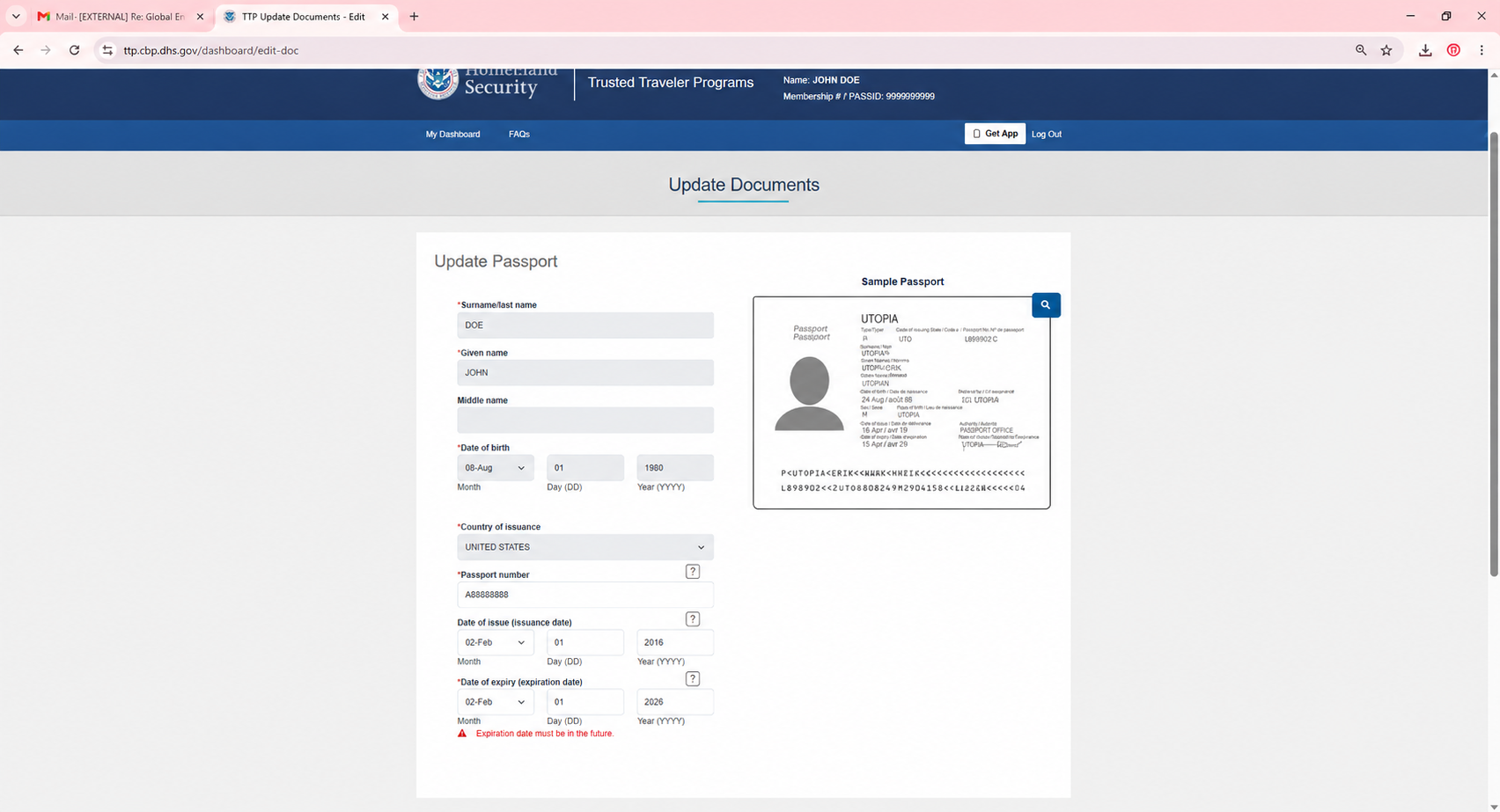
The official “Update Passport” page inside a Trusted Traveler account at ttp.cbp.dhs.gov. The details shown here are sample data.
One important exception: if your mom’s name changed (for example, after a marriage or a legal name change), you cannot update it online. CBP requires a visit to a Global Entry enrollment center so an officer can update the record in person.
How to Spot a Fake “Update Your Passport” Email
A real reminder and a scam can look nearly identical, so it helps to know what is true:
- There is only one official Trusted Traveler website: ttp.cbp.dhs.gov. CBP says it does not work with third-party “helper” sites, and genuine government sites end in .gov.
- Updating a passport is free. Be wary of any page that asks you to pay to “update” a document, or that charges more than the official membership fee. The real Global Entry membership fee is $120 for five years, paid only at ttp.cbp.dhs.gov when you apply or renew — never just to update a passport.
- Watch for red flags: urgent “act now or lose your benefits” pressure, links to a .com or odd web address, requests for a Social Security number or credit card by email, and small spelling or grammar slips.
- The rule that beats every fake: do not click the email. Type ttp.cbp.dhs.gov yourself, or use the official Trusted Traveler app. If something feels off, report it at ReportFraud.ftc.gov.
A Few Tips for Helping an Older Parent
A few small habits make this easy every time:
- Do it together at her kitchen table, signed in to her own account.
- Keep a simple note — or a photo in a secure spot — of her new passport number and expiration date, so the next renewal is quick.
- Add a calendar reminder for the month her passport expires, and update the account as soon as the new one arrives.
- The update is on file right away, but it can take time to appear everywhere. If a kiosk ever sends her to an officer, CBP says she can simply go to the nearest passport-control booth — she does not have to go back to the end of the line.
- Planning an international family trip in the next year? Add “check Global Entry” to your pre-trip list.
Before You Travel: Quick Checklist
- Passport renewed? Update it in her Trusted Traveler account.
- Name unchanged? You can do it online. Name changed? Visit an enrollment center.
- Start only at ttp.cbp.dhs.gov — never an email link.
- Updating is free; only the 5-year membership renewal has the official $120 fee.
Goldie’s Table: Trusted Links & Quick Answers
|
What You Need |
Where to Go & What to Know |
Official Link |
|---|---|---|
|
Official Trusted Traveler site |
The only place to manage Global Entry and update a passport. Genuine sites end in .gov. |
|
|
Secure sign-in (Login.gov) |
The government’s secure single sign-in. Always start at the Trusted Traveler site above, then sign in. |
|
|
Update a passport (no name change) |
Free. In the account, choose Update Documents → Update Passport. |
|
|
Passport with a name change |
Must be done in person at a Global Entry enrollment center so an officer can update the record. |
|
|
Membership renewal (every 5 years) |
The official fee is $120 for five years, paid only on the .gov site. Many travel Credit cards reimburse it. |
|
|
Report a scam |
If an email, text, or website looks fake, report it — it helps protect other families too. |
Sources: U.S. Customs and Border Protection (Global Entry FAQ); U.S. Department of State / DHS Trusted Traveler Programs; Login.gov; the Federal Trade Commission; and the Better Business Bureau.
Photos adopted from ChatGPT, Claude and U.S. Customs and Border Protection.
This article is general information for caregivers and families, not legal or immigration advice; always follow the official guidance at ttp.cbp.dhs.gov.
Disclaimer: GoldieCircle may recommend third-party products and services based on internal evaluation. Such recommendations do not constitute a warranty or guarantee of performance, suitability, or lifespan. All products are subject to their respective manufacturers’ terms and conditions. GoldieCircle assumes no liability for any claims or damages arising from the use of any recommended product or service.


Loading comments…