

REAL-WORLD WAKE-UP CALL: On March 28, 2026, a 76-year-old driver lost control of his vehicle in San Francisco’s Chinatown and slammed through the front of a business, killing 49-year-old pedestrian Cutberto Zamora-Martinez. It was the second high-profile fatal crash in that city in recent months involving an older driver. Across the country, the CDC reports roughly 25 older adults are killed and more than 740 are injured in motor-vehicle crashes every day in the United States. In 2024, the National Highway Traffic Safety Administration counted 8,019 traffic fatalities among people 65 and older.
After Mom’s fender-bender last spring, she sat in the driveway and cried. She wasn’t hurt. The car was a write-off. But what she really lost that afternoon was her confidence. She still wanted to live alone. She still wanted to make her own doctor’s appointments, see her grandkids, grab her own groceries. She just didn’t trust herself behind the wheel anymore — and honestly, we didn’t either.
That’s when we sat down at her kitchen table with her iPhone and a cup of decaf, and learned how to use Uber together. This article is what I wish someone had handed me that day.
- Uber app (free) — iOS and Android. One-time setup. After that, requesting a ride is three taps. No phone calls, no waiting on hold, no cash exchanged. Payment is automatic via a saved card.
- Blue Safety Shield — Visible during every ride in the top-right corner of the map. Taps open a one-screen menu with 911, audio recording, trip-sharing, and report-a-problem options. Designed to be reachable with one finger.
- Driver ID Verification (Active by default) — Per Uber, drivers must regularly take a selfie before starting trips to confirm their identity matches the account.
- Personal Data Privacy (Active by default) — After a ride ends, the driver cannot see the rider’s exact address in their trip history. This protects seniors who live alone.
- Verify Rides with a PIN (Opt-in) — Uber generates a 4-digit code the rider reads aloud to the driver before the trip begins. The trip will not start until the driver enters the correct code. Stops a senior from getting into the wrong car.
- RideCheck / Auto-Detour Detection (Active by default) — Uber’s sensors and GPS automatically detect unexpected stops, route detours, or possible crashes. If something looks wrong, Uber sends an in-app check-in and offers emergency tools.
- Trip Recording (Active by default in many cities) — The driver is recording the trip for added safety. Audio recordings (when used by the rider) are encrypted on the device. According to Uber, no one — not the driver, not Uber, not even the rider — can play it back unless the rider reports an incident and chooses to share it.
- Share My Trip / Trusted Contacts (Opt-in, highly recommended) — The whole route, driver photo, license plate, and live location are shared with up to five family members in real time. Mom doesn’t have to call anyone — they already know where she is.
Once these are turned on, the senior doesn’t have to remember any of them. The safety features run silently in the background. Caregivers and family see ride status from their own phones.
Quick Setup Guides
Sit down with your parent and walk through the setup together. It usually takes 15–20 minutes the first time, and once a quarter for a quick refresher. The features run automatically — but everyone should still do an occasional spot check together.
First-Time Uber Setup (One-Time, with a Family Member)
- Open the App Store (iPhone) or Google Play (Android). Search for Uber. Tap Get or Install.
- Open Uber. Enter your parent’s mobile number. Verify with the text-message code.
- Add a payment method (debit card, credit card, or a prepaid Uber gift card so spending stays predictable).
- Save common addresses: Home, Pharmacy, Doctor’s Office, and the grocery store. Tap Account → Saved Places → Add.
- Turn on large-text mode in iPhone settings (Settings → Display & Brightness → Text Size) so the app is easy to read.
The Blue Safety Shield (Where Everything Lives)

Tap the blue shield during any ride and these five tools appear in big tap-friendly buttons.
- Open the Uber app and request any ride to practice (you can cancel within 2 minutes at no charge — confirm Uber’s current cancellation window in the app).
- Once the trip starts, the blue Safety shield appears in the top-right corner of the map.
- Tap it. Five large buttons appear: Contact 911, Contact safety agent, Record audio, Share trip status, and Report safety issue. One tap per button.
- Have your parent practice tapping the shield until it feels natural. Muscle memory matters more than reading instructions in a moment of stress.
Driver ID Verification
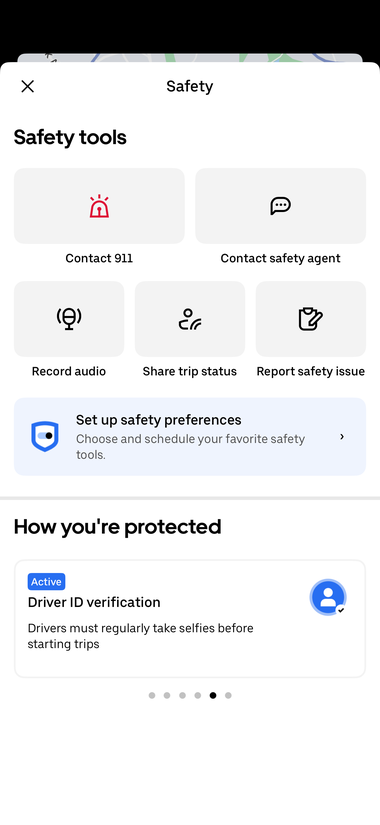
Active by default. According to Uber, drivers periodically prove they are the person on the account before they can begin a trip.
- No setup needed. This is on by default for all riders.
- When the driver pulls up, the app shows the driver’s photo, name, license plate, and car make/color. Always check the photo and license plate before opening the door.
- If anything doesn’t match, do not get in. Tap Cancel ride and request another.
Personal Data Privacy (Address Anonymization)
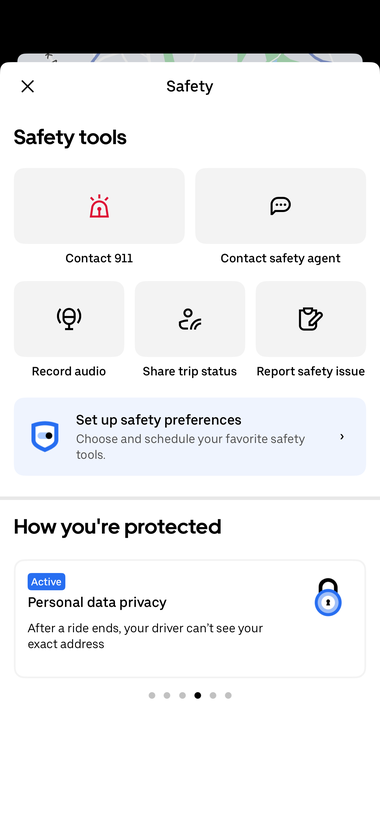
Active by default. Drivers don’t see Mom’s exact home address after the trip closes.
- No setup needed. Uber anonymizes the home address in the driver’s trip history.
- Phone numbers are also masked. If the driver calls or texts, the call goes through a relay number — not your parent’s actual cell number.
- For extra privacy, drop the senior off at the building entrance or one address over, rather than directly at the front door. Common for high-rise buildings and gated communities.
Verify Rides with a PIN
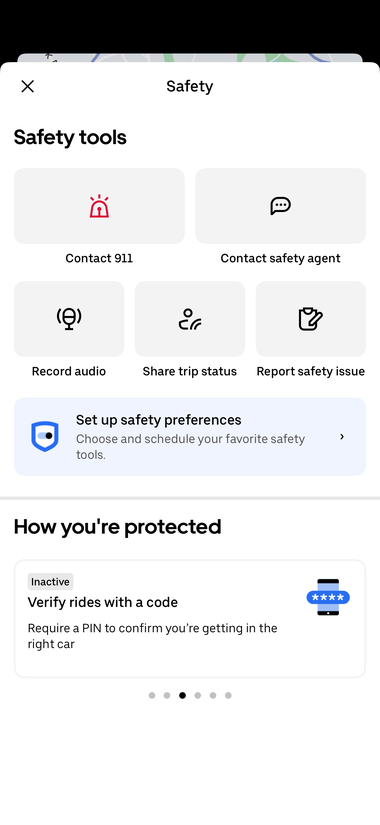
Inactive by default — turn this ON. The PIN is the single biggest theft and wrong-car protection for older riders.
- Open the Uber app → Account (bottom-right) → Safety preferences (or Settings → Safety).
- Find Verify your ride (also shown as PIN verification). Tap to turn it ON.
- From now on, every trip generates a 4-digit PIN visible on the rider’s phone. The senior reads it out to the driver. The trip will not start until the driver enters it correctly.
- An elderly rider who is hard of hearing or has slower vision may not catch a mismatched plate. The PIN forces the driver to confirm. No PIN, no ride.
Auto-Detour Detection (RideCheck)

Active by default. If the car takes a wrong turn or stops unexpectedly, Uber will reach in and check on Mom.
- No setup needed. Uber’s sensors and GPS detect long unexpected stops, off-route detours, and possible crashes.
- If RideCheck triggers, both the rider and the driver get an in-app check-in: Is everything OK? From that screen, the rider can immediately tap into 911, safety agent, or trip sharing.
- Reassure your parent: if she misses a tap or the screen times out, Uber’s safety team can follow up directly.
Trip Recording

Where available. The driver is recording — passengers can also record audio from the Safety menu.
- Driver-side video/audio recording is available in many U.S. cities. Where it’s on, the app shows Active under Trip recording.
- Riders can also record audio themselves: tap the blue shield → Record audio. Per Uber, the recording is encrypted and stored on the device; no one — not the driver, not Uber, not the rider — can play it back unless the rider reports an incident and chooses to share it.
- For most senior rides, you don’t need to start a recording yourself. It’s there if a moment ever feels off.
Share My Trip with Trusted Contacts
- Open Uber → Account → Settings → Trusted Contacts.
- Add up to five family members or close friends by phone number — ideally including at least one adult child and one local contact.
- Set the sharing rule: every ride, only at night, or only weekends. For an elderly parent who lives alone, share every ride is the simplest choice.
- Family members receive an SMS link the moment the ride begins. They can see the live route, the driver’s photo, the license plate, and the ETA — without installing Uber themselves.
- Pro tip: Send a test ride one Saturday afternoon. Everyone confirms they got the link and can see the route. Now the system is proven before a real emergency.
Things to Consider
- Uber requires a working smartphone, a charged battery, and a data plan or Wi-Fi. Put a charger by the front door and another in Mom’s purse.
- Mobility-limited riders may want to request Uber Assist (where available) — drivers trained to help with walkers, canes, and folding wheelchairs. Open the app → select vehicle type → look for Assist.
- Some Medicare Advantage plans and Area Agencies on Aging now cover or subsidize Uber Health rides to medical appointments. Ask the senior’s plan or local AAA office.
- Set a monthly Uber spending alert with the credit-card issuer to catch surprises. Many cards now offer category-level alerts.
- Practice the Help button location ahead of time so it feels familiar in a stressful moment.
- Confirm current Uber feature availability and settings in the app, as menus and defaults occasionally change.
Our Top Pick for Loved Ones
|
Service |
Why It Helps Seniors |
Link |
|---|---|---|
|
Uber |
Free app for iPhone and Android. Three-tap ride requests with no cash, no phone calls, and no waiting on hold. Built-in safety features include PIN verification, RideCheck auto-detour detection, encrypted audio recording, anonymized home addresses, driver ID re-verification, and live trip sharing with up to five family members. Designed so a senior can live independently without driving — and so caregivers know where she is on every trip. |
Photos adopted from AI and Uber. Uber screenshots are personal screen captures from a family member’s iPhone, with the home address anonymized.
Disclaimer
Disclaimer: GoldieCircle may recommend third-party products and services based on internal evaluation. Such recommendations do not constitute a warranty or guarantee of performance, suitability, or lifespan. All products are subject to their respective manufacturers’ terms and conditions. GoldieCircle assumes no liability for any claims or damages arising from the use of any recommended product or service. This article is informational only and is not legal, medical, or professional driving advice. For questions about an older adult’s fitness to drive, please consult their physician or a certified driver rehabilitation specialist.


Loading comments…