
|
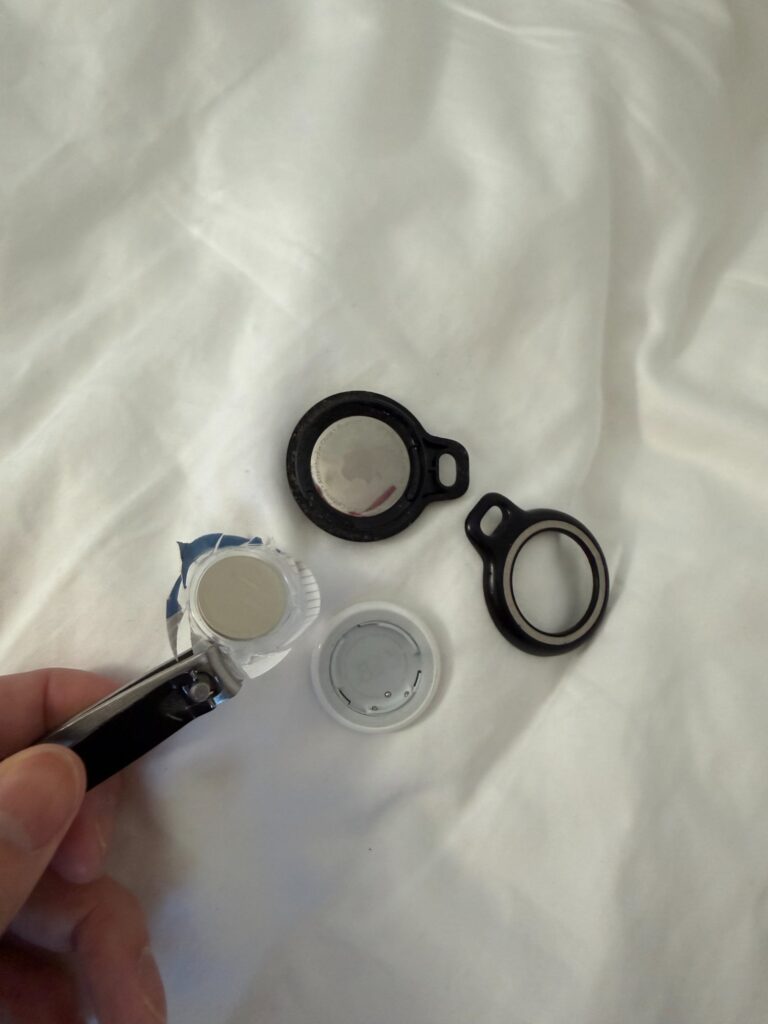
REAL-WORLD WAKE-UP CALL: Apple AirTags are one of the best tools families use to keep track of a senior’s keys, wallet, or purse. But when the battery dies — and it will, usually after about a year — most seniors struggle with the tiny twist-open cover. For someone with arthritis, Parkinson’s, or limited grip strength, that small motion can feel impossible. The fix? A tool most families already own: nail clippers. No special skills, no trips to a repair shop. Just two products and about 60 seconds. |
Quick Setup Guide
A caregiver or family member should do this the first time. Once you’ve done it once, most people find it easy to repeat. Always confirm with the AirTag manufacturer’s documentation at support.apple.com for the most current instructions.
How to Replace an AirTag Battery
- Find the low battery alert. Your parent’s iPhone will display a notification when the AirTag battery is low. Open the Find My app → Items tab → tap the AirTag name → battery icon shows status.
- Gather your supplies. You’ll need: one CR2032 coin cell battery (no bitter coating) and a pair of nail clippers with a sturdy lever arm.
- Open the AirTag. Place the AirTag with the white side facing up. Press down gently with your thumb while rotating the silver back cover counterclockwise. If this is difficult, slip the flat edge of the nail clipper lever under the edge of the silver cover and apply gentle upward pressure while rotating. The cover should pop free.
- Remove the old battery. Tip the AirTag and the old CR2032 coin cell will slide out. Recycle it properly — CR2032 batteries contain lithium and should not go in regular trash. Check earth911.com for local recycling options.
- Insert the new battery. Place the new CR2032 with the positive side (labeled “+”) facing up. You should hear a chime from the AirTag when it powers on.
- Close the AirTag. Align the silver cover’s three tabs with the slots on the white base. Press down and rotate clockwise until it clicks into place.
- Confirm in Find My. Open the Find My app on the iPhone → Items → tap the AirTag. It should show as active and nearby. The battery icon should show full or near-full.
Using Nail Clippers to Open the Battery Package — Tips
- Hold the CR2032 blister pack flat on a table. Use the nail clipper to cut along the outer edge of the plastic clamshell — one or two clips is usually enough to break the seal.
- Cut around the edge only — avoid cutting directly over the battery itself to prevent scratching or damaging it.
- Once the plastic is open, tip the battery out gently. Do not squeeze or crush the blister pack — the battery can be slippery and small.
- This is a practical tip to help with hard-to-open packaging. It has not been officially endorsed by Apple, Tweezerman, or Energizer. Always handle coin cell batteries carefully and keep them away from children.
- If cutting the packaging is still difficult, ask a caregiver or family member to open it. The battery replacement itself is simple once the battery is out of the package.
Things to Consider
- Always use a CR2032 battery without a bitterant (bitter) coating for AirTags. Batteries with this coating may not make reliable contact inside the AirTag. (Source: Apple Support)
- AirTag batteries last approximately 1 year under typical use, though actual life varies based on location frequency and environment. (Source: Apple Support)
- Do not use a damaged or leaking battery. Dispose of used batteries safely.
- If the AirTag does not reconnect after battery replacement, check that the battery is properly seated with the positive (+) side facing up.
- If a senior is using an AirTag attached to a medical item (e.g., medication bag, cane), make sure the AirTag is fully closed and secure before reattaching.
Goldie’s Table — Buy These for Your Loved Ones
|
Product |
Why It Helps Seniors |
Link |
|---|---|---|
|
Tweezerman Stainless Steel Combo Set (Fingernail & Toenail Clippers) |
Stainless steel precision lever provides grip and torque to twist open an AirTag — ideal for seniors with arthritis or limited hand strength. Doubles as an everyday nail care tool. |
|
|
CR2032 Lithium Coin Battery (No Bitter Coating, 4-Pack) |
AirTag requires a CR2032 battery. Apple advises using a battery without a bitterant coating for reliable contact. Look for products labeled ‘No Bitter Coating’ or ‘AirTag-compatible.’ |
|
|
Apple AirTag (1-Pack or 4-Pack) – 2nd Generation |
GPS-free Bluetooth tracker that helps families locate a senior’s wallet, keys, purse, or bag from an iPhone using Apple’s Find My network. Battery replaceable by anyone — no tech skills needed after initial setup. |
|
|
Tech21 EvoClear Case with Carabiner (2-Pack) |
Drop-proof clear case with carabiner clip. UV-resistant, scratch-proof. Clips to belt loops, purses, luggage, key rings. |
Disclaimer:
GoldieCircle may feature third-party products and services based on internal evaluation. Such top picks do not constitute a warranty or guarantee of performance, suitability, or lifespan. All products are subject to their respective manufacturers’ terms and conditions. GoldieCircle assumes no liability for any claims or damages arising from the use of any featured product or service. The techniques described in this article, including the use of nail clippers to assist with opening an AirTag, are practical adaptations intended to help those with limited dexterity and have not been officially endorsed by Apple Inc. or Tweezerman. Always refer to official manufacturer documentation. This article is for informational purposes only and does not constitute medical, occupational therapy, or professional advice. If a person has significant difficulty with fine motor tasks, consult a qualified healthcare provider.

Loading comments…